Sunday, 25 October 2015

Best CMD Commands Hacks and Tricks

Cmd Tricks for your windows pc that make your pc more smart. Here we make a list of best cmd tricks for command prompt. With these cmd tricks you create wifi hotspot, know more about your internet and system and lots of other info. Try all of these command prompt tricks in your windows pc and make your pc more smarter.

Best CMD(Command Prompt) Tricks for Your PC

#1 Create WIFI Hotspot

You can create wifi hotspot from your laptop without any software from cmd. You need to do only type some commands. With this cmd trick you can share your pc internet with mobile device or another laptop.
 netsh wlan set hostednetwork mode=allow ssid=prophethacker key=prophethacker netsh wlan start hostednetwork 
For about how can share your PC Data with Internet Read our Previous Articles Turn your Laptop into WIFI Hotspot without any Software

#2 Find Your Computer IP Address, DNS Server Address and MAC Address

This is most important CMD  command tricks for all internet users. If you want to know more about your internet connection type ipconfig/all command in Command Prompt. You get lots of info about your computer internet.

#3 Matrix Falling Code Effect

If you see the Matrix Science Fiction Movie you know the random code appears in screen. Here we make a same matrix effect by some codes. You need to copy below codes and paste in your notepad. Save Notepad text as  matrix.bat . Open matrix.bat file and you see the matrix falling code in your command prompt.
 @echo off color 02 :tricks echo %random%%random%%random%%random%%random%%random%%random%%random% goto tricks 

#4 Know you Detailed System Information

Want to know more about your computer software and hardware. Type systeminfo in command prompt and you see tons of info your command system. You see your computer os, architecture, manufacturer name, product id, processor and lots of other info.

#5 Find any Website Ip Address

If you don’t know what is the ip address of google.com and you wanna want to know. Command prompt tell you all website ip address when you ping any website from command prompt.
ping google.com
you get below result with ip addresss
Pinging google.com [216.58.220.14] with 32 bytes of da
replace your website with google.com and you see any website ip address.

Labels: ,

Saturday, 24 October 2015

Switcheroo Lets You Control Stuff With Your Smartphone!

Switcheroo Lets You Control Stuff With Your Smartphone!

switchroo
IoT buzz is all around and people are building great stuff. Few weeks back, we talked about upcoming IoT development kits – CHIPModulo and Cubit, which will help you in building IoT projects easily and effectively. Today, we found another great product called Switcheroo, which lets you control stuff with your smartphone. Switcheroo started trending on Kickstarter last week and it e to you soon.

What is  Switcheroo?

In layman’s language “Switcheroo is nothing but a wireless switch which you can control with your smartphone”.  With this you can control almost anything with your smartphone. The Switcheroo makes it a snap to upgrade everyday devices for smartphone control. The Switcheroo can do things like;
  • control toys
  • unlock doors
  • start your car
  • turn on lights
  • open/close your garage door
  • control your heat
  • remote shutter release for cameras
  • upgrade anything with a pushbutton

How does it work?

All your devices which has a push button or a switch can be easily integrated with Switcheroo. These buttons typically actuate small internal switches which pass low voltage DC current to a microprocessor when the button is pressed. The Switcheroo can be easily wired into this simple switch circuit to take the place of that switch or act in concert with it, upgrading these devices to allow direct smartphone control. The Switcheroo has 4 opto-isolated outputs that can switch DC voltages from 2 to 24 volts, up to 150mA of current per output. For AC voltages or higher current applications you can connect relays or solid state switching ICs to Switcheroo and do even more.
Switcheroo directly communicates with your phone. There is no 3rd party server involved, no monthly fees, and no internet access is required for your phone or the Switcheroo. Switcheroo uses Bluetooth Low Energy which offers AES-CCM encryption to secure the low energy link between Switcheroo and your smartphone.
Also See: CHIP is the World’s Cheapest Computer and Costs Just $9
Guys behind Switcheroo are great and they have made everything Open Source. All Switcheroo app code is available now and will be maintained athttp://github.com/switcheroo. Switcheroo kickstarter campaign is live and you can make your contribution to get a kit for yourself at $29

Labels: ,

A World Without Linux – A World Without Internet (Episode 1)

world-without-linux-episode-1-name-songShort Bytes: Linux is the largest collaborative project in the computing history. It’s literally everywhere. And to showcase this, The Linux Foundation has brought a video series named A World Without Linux. Watch the first episode here.
You are using the internet right now on your smartphone or computer.Is this possible without Linux? There is a plain and simple answer to this question. NO. This is the message that The Linux Foundation wants to convey with its first episode of A World Without Linux video series.
This series was launched a week ago on the occasion of the 24th anniversary of the first Linux kernel release. This six-part video series will feature two characters and their feline called String.
In the video series, with the help of multiple events, they will show how ridiculous a world without Linux would be.
In the very first episode, Sam and Anne are trying to find an answer to a question that you can search right away on your phone. But, in a world without Linux, a different story unfolds.
To know the answer, watch A World Without Linux: Episode 1 below:
For those who don’t know, Linux powers more than 96% of the top 1 million web servers. To showcase the same, Animator Amelia Lorenz has worked very hard to bring this unimaginable world without Linux in the form of this video series.
Go ahead and share this article with your friends to show your Linux love. In the comments below, tell your interpretation of a world without Linux.

Labels: ,

Thursday, 22 October 2015

How To Format Pendrive Using CMD


Today we are here with the method for How To Format Pendrive Using CMD. Today with the advancement in the technology and the trending computer use the use of data transfer medium is also increase. And today about every person who deals with computer work must deal with the data transfer between two computers. As the most commonly used media used today to transfer contents is USB. And also today there are lots of virus that has been present which can come into your computer through these pendrive. So better is to remove the virus regularly and format the drive properly to remove virus from it to protect your computer from viruses. Just follow up the below post to proceed.

How To Format Pendrive Using CMD

In this method we will be discussing about the method if cmd by which you can easily format your USB pendrive and also the virus of the pendrive will get deleted by this. You just have to follow the below steps to format the drive and make it virus free using simple cmd trick 2015.

Steps To Format Pendrive Using CMD

First of all boot up your computer in normal mode.
Now insert your USB pendrive in your computer.
Now watch out the name of your drive, note that the name must not be listed in any other than the drives, Lilke it must be like G, F drive etc.
Let your USB pendrive is listed as “D: removable storage device” in your my computer.
Now in your windows type the window button of your keyboard and type “cmd“.
Now the command prompt window will get displayed on your screen.
Now type there “Format D:” if you want to normal format your USB pendrive.
If you want to format your drive with FAT32 then you have to type Format D: /FS: FAT32 .
Thats it your pendrive will get formatted by this and now you access a virus free pendrive for your work.
So above is all about How To Format Pendrive Using cmd. By this method you can easily format your pendrive with command prompt with the simple cmd trick. And this method will make your pendrive more faster and will remove all the viruses like malware and trojans etc from it. Hope you like the post. Don’t forget to share it with your friends and leave a comment below if you have any related query with this topic.

Labels: ,

WHATSAPP WEB ALLOWS USERS TO USE WHATSAPP ON PC DESKTOP AND IPHONE


After launching Web version of Whatsapp earlier this year, Whatsapp Web finally makes it way to iPhone. Earlier iPhone users had no access to use Whatsapp web due to 'Limitations of Apple Platform',  but now iPhone users can also access the WhatsApp web version by browsing in Internet browsers like Google chrome. In this post, you will find the steps of how to use Whatsapp on your Computer desktop without Installing any software on your Computer to use Whatsapp. Whatsapp web has created a great project to use Whatsapp on Computers without downloading WhatsApp app.

Why do we need to use Whatsapp on The web?

Sometimes, We are working on Computer and at the same time somebody starts sending messages on Whatsapp; We also want to reply, but we feel frustrated on checking the phone again and again while working on PC. But If we will be using the Whatsapp on web with the help of Whatsapp web, then we will need not to be frustrated because then we will easily manage Whatsapp chat with our work.

How to use Whatsapp Web?

1. Visit https://web.whatsapp.com/ on your computer's Internet browser, Click on the Icon given at the top of Website.
2. Open Whatsapp App on your smartphone or Android devices.
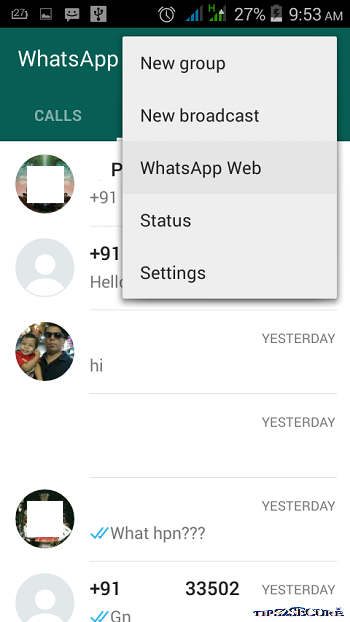
3. Click on three dots, and click on WhatsApp Web


Whatsapp web to use whatsapp on desktop

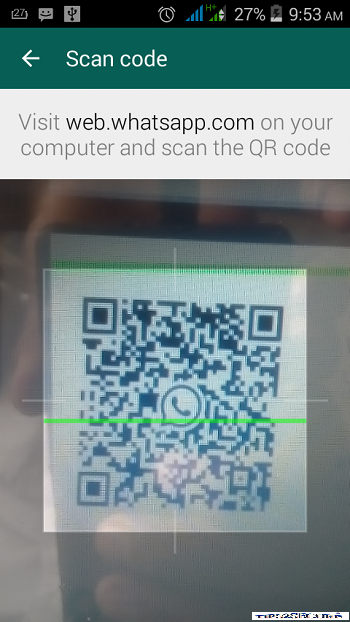
4. Now scan the QR code from the Website

how to use Whatsapp web version


5. Done, You are online now.


Tip: Don't close or uninstall whatsapp from your smartphone, once you start using it on your Computer.

Message: I hope that you have enjoyed 'Whatsapp Web Allows Users to Use Whatsapp on PC Desktop and iPhone' article. However, if you want me to deliver more items then please share my post. You can use Social Sharing Widget provided at the end of every post. After all, Sharing is Caring!

Labels:

YouTube paid version launched: 6 things to know

After months of speculation, Google has announced YouTube Red, a paid service based on the company’s free video-sharing platform, and music streaming app YouTube Music. Here are 6 things you should know about the two new versions of YouTube...

Labels: